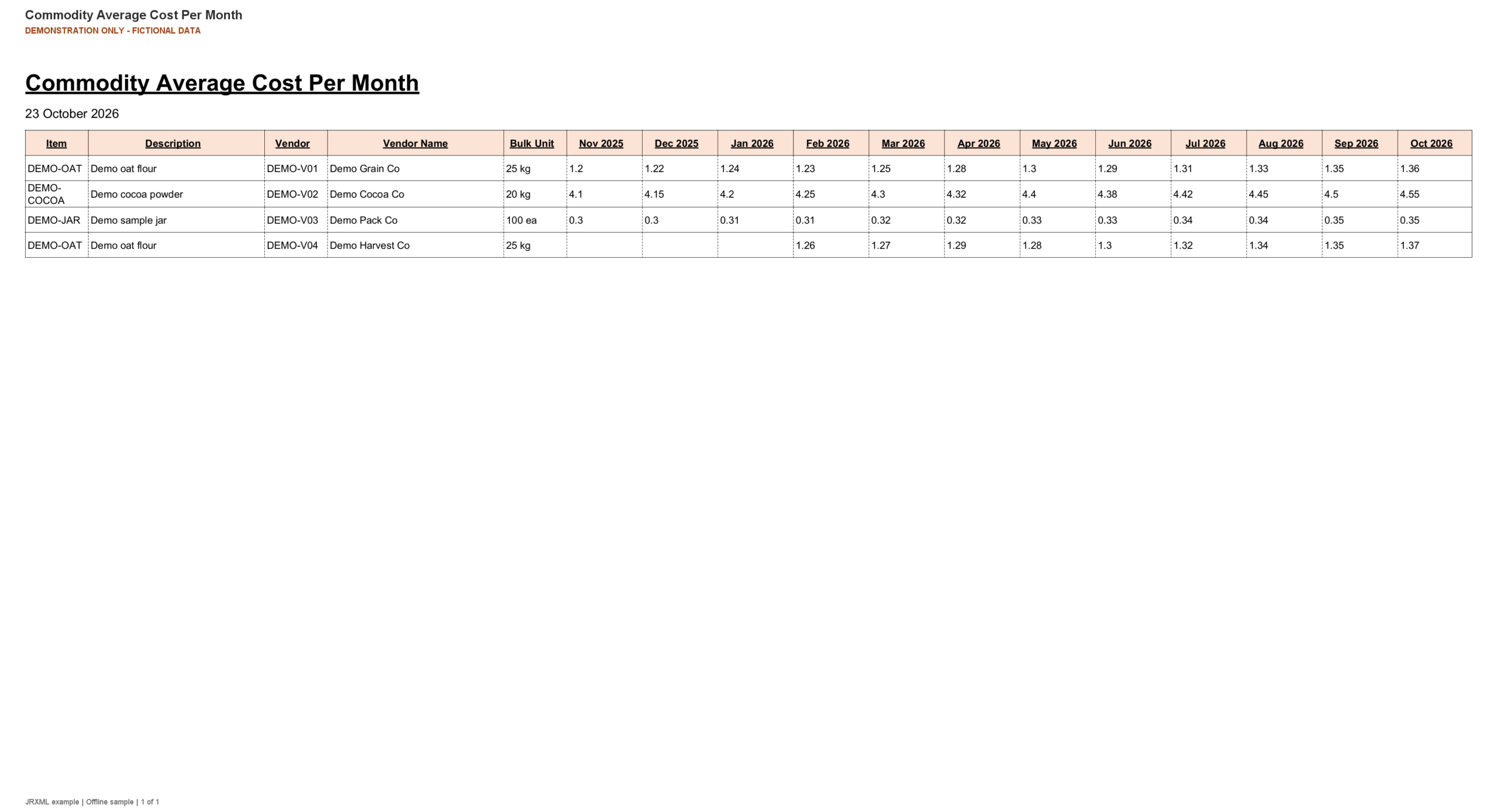
Commodity Average Cost Per Month compares recorded receipt costs across a rolling 12-month period ending in the selected month and year. Results are arranged by item and vendor, with a column for each month.
Each monthly value is the arithmetic average of stock cost records received during that month. Months without matching cost records appear blank; the query does not calculate a quantity-weighted average.
Report Setup
Select the month and year that should end the 12-month comparison.
Run the report. Selecting October 2026 displays November 2025 through October 2026 in the example.
Compare monthly values for each item/vendor combination, taking account of its displayed bulk unit.
Example input controls, reconstructed from the report parameters. Installed labels, choices and defaults may differ.Click the image to enlarge.
Sample Report
The example below uses fictional records populated into the report’s Jasper layout. Demonstration labels have been added; the content and number of pages depend on your data and selected options.
Commodity Average Cost Per Month — fictional example data.Click to enlarge, or save this image.
The report contains:
Item and vendor — Vendor code and name, item code and description, and bulk unit identify each cost series.
Monthly average costs — Twelve month columns show average stock cost; a blank indicates no non-null cost records for that month.
Links To
This report does not include links to other reports.
Was this page helpful?
YesNo
Manage Cookie Settings
We want to make your experience on our website as personalized and enjoyable as possible. To do this, we use cookies – these are tiny bits of data that help us understand how you use our site and tailor it to your preferences.
Rest assured, we value your privacy and are committed to keeping your data safe. By clicking "Continue with recommended settings," you're giving us permission to use cookies. Of course, you're in control – feel free to adjust your cookie settings anytime in our Privacy Preferences.
Functional
Always active
The technical storage or access is strictly necessary for the legitimate purpose of enabling the use of a specific service explicitly requested by the subscriber or user, or for the sole purpose of carrying out the transmission of a communication over an electronic communications network.
Preferences
The technical storage or access is necessary for the legitimate purpose of storing preferences that are not requested by the subscriber or user.
Statistics
The technical storage or access that is used exclusively for statistical purposes.The technical storage or access that is used exclusively for anonymous statistical purposes. Without a subpoena, voluntary compliance on the part of your Internet Service Provider, or additional records from a third party, information stored or retrieved for this purpose alone cannot usually be used to identify you.
Marketing
The technical storage or access is required to create user profiles to send advertising, or to track the user on a website or across several websites for similar marketing purposes.
To provide the best experiences, we use technologies like cookies to store and/or access device information. Consenting to these technologies will allow us to process data such as browsing behavior or unique IDs on this site. Not consenting or withdrawing consent, may adversely affect certain features and functions.
Functional
Always active
The technical storage or access is strictly necessary for the legitimate purpose of enabling the use of a specific service explicitly requested by the subscriber or user, or for the sole purpose of carrying out the transmission of a communication over an electronic communications network.
Preferences
The technical storage or access is necessary for the legitimate purpose of storing preferences that are not requested by the subscriber or user.
Statistics
The technical storage or access that is used exclusively for statistical purposes.The technical storage or access that is used exclusively for anonymous statistical purposes. Without a subpoena, voluntary compliance on the part of your Internet Service Provider, or additional records from a third party, information stored or retrieved for this purpose alone cannot usually be used to identify you.
Marketing
The technical storage or access is required to create user profiles to send advertising, or to track the user on a website or across several websites for similar marketing purposes.