

Единицы измерения
Ваш путеводитель по интеграции V5!

Интеграция единиц измерения между V5 Traceability и системой ERP клиента позволяет отправлять единицы измерения, используемые системой ERP/третьей стороной, в V5 Traceability. Затем эти единицы можно применять для складирования и формулирования/производства в системе V5 Traceability.
Гибкость системы V5 Traceability позволяет полностью настраивать единицы измерения с возможностью установки пользовательских преобразований единиц для больших количеств, таких как ящики и бочки, а также устанавливать коэффициенты преобразования для конкретных товаров. Конкретные коэффициенты преобразования особенно полезны для товаров с определенной плотностью, как мы увидим в примере ниже.
Для классов «WeightUnit» и «UnitCommodity», которые мы здесь рассмотрим, доступен только импорт; экспорт недоступен ни через методологии JSON, ни через CSV.
Более подробную информацию о работе с единицами измерения в модуле V5 Traceability можно найти в нашем руководстве по модулю здесь.
Содержание
1. Схема центра управления
С точки зрения того, как мы можем соотнести единицы измерения и коэффициенты пересчета конкретных товаров с тем, что мы видим в Центре управления, мы видим, что верхняя панель здесь предназначена для ввода наших единиц измерения, а нижняя панель — для коэффициентов пересчета конкретных товаров для единицы, выбранной на верхней панели.
Если запись на нижней панели отсутствует для данного товара, то система вернется к курсу конвертации, установленному на верхней панели, когда товар используется с этой единицей. После того, как товар добавлен на нижней панели и к нему добавлен курс конвертации ('UnitCommodity'), это затем переопределяет курс конвертации на верхней панели.
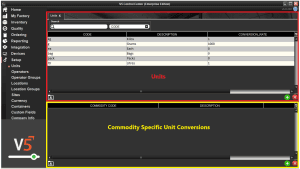
Используя шлюз V5, мы можем легко заполнить обе панели.
2. API-ссылки
3. Шаблон интеграции
4. Полевое руководство по подразделениям
4.1. Первичные ключи
Первичные ключи — это уникальные идентификаторы каждой таблицы в API V5.
Для WeightUnit это выглядит так:
код – уникальный код единицы измерения (например, г, кг, фунт, унция и т. д.).
Для объекта UnitCommodity первичными ключами являются:
unit.code – уникальный код единицы измерения, как указано выше.
и
commodity.code – Уникальный код товара, к которому применяется конкретный курс конвертации.
4.2. Обязательные поля
Другие поля, которые требуются SG для заполнения действительной записи в Центре управления:
Для WeightUnit:
conversionRate – Коэффициент конверсии для данного подразделения по отношению к подразделению с ID 1 в базе данных.
Для UnitCommodity :
conversionRate – конкретный коэффициент конверсии для конкретного товара.
4.3. Предпочтительные поля
Поля "Предпочтительные" позволяют добавить дополнительную информацию к единице измерения ( WeightUnit ) и, хотя и не являются обязательными, полезны для обеспечения функциональности в рамках системы отслеживания V5.
Описание – описание единицы измерения (килограммы, фунты и т. д.).
4.4. Дополнительные поля
В поле WeightUnit также можно добавить дополнительные поля , такие как:
Примечания – любые дополнительные примечания к данному разделу
5. Методология
Учитывая относительно простую природу этого класса, мы можем использовать интеграцию JSON или CSV для импорта единиц в V5. Мы рассмотрим это с точки зрения выполнения начального импорта для внесения любых недостающих единиц в систему (weightUnit), после чего мы назначим товарно-специфические преобразования с использованием единиц в системе (UnitCommodity). Обратите внимание еще раз, что экспорт недоступен ни для одной конечной точки/класса.
6. Весовая единица
6.1. JSON — Импорт
Конечная точка/URI импорта ''WeightUnit' –
http://host:port/V5-API/api/integrate/import/unit
Образцы:
Для этого примера импорта мы будем использовать конечную точку 'WeighUnit' для добавления фунтов и унций в таблицу единиц Control Center, показанную выше во введении. Файл JSON для этого будет выглядеть следующим образом:
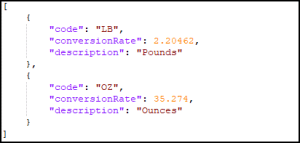
Обратите внимание, что коэффициенты пересчета всегда будут рассчитываться относительно единицы измерения по умолчанию (т. е. первой единицы в таблице единиц измерения), поэтому здесь мы рассчитываем их относительно килограммов (кг).
Этот пример JSON-файла можно скачать здесь.
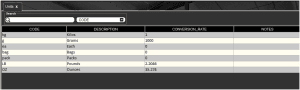
Используя приведенный выше файл, мы видим, что наши новые подразделения были созданы в Центре управления.
6.2. JSON — Экспорт
Для класса «WeightUnit» экспорт JSON недоступен.
6.3. CSV – Импорт
Имя файла с определением заголовка/столбцов: “weightUnit.csvh”
Завершенные заголовочные файлы следует разместить в папке: “<installdir>\SG Control Center\gateway\import\column_defs”
Имя импортируемого CSV-файла: “weightUnit-datetime.csv”
CSV-файлы для импорта следует разместить в папке: "<каталог установки>\SG Control Center\gateway\import"
Образцы:
Заголовочный файл:
Заголовочные файлы обычно компилируются SG Systems до интеграции CSV, но ниже мы можем увидеть простой пример того, что можно использовать для единиц измерения:
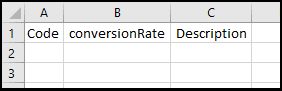
Для получения более подробной информации о структуре этих файлов, пожалуйста, посетите главную страницу интеграции.
Этот пример заголовочного файла можно скачать здесь.
Файл импорта CSV:
Затем мы можем использовать определенный порядок точек данных в заголовке, чтобы структурировать наш файл импорта. SG Systems может предоставить для этого файл шаблона, в котором перечислены точки данных для каждого столбца, чтобы было понятнее при заполнении списка. Обратите внимание, что эта первая строка может быть проигнорирована Центром управления и поэтому может быть сохранена в файле при отправке на импорт.
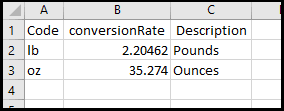
Здесь мы видим, что мы создаем те же новые единицы, что и в примере JSON выше, но используем строчные буквы для кода единиц, чтобы это было более наглядно отображено в Центре управления.
Этот пример файла импорта можно скачать здесь.
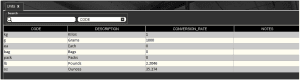
После завершения импорта мы видим, что эти новые единицы снова были созданы.
6.4. CSV — Экспорт
Как и в случае с экспортом JSON, экспорт CSV для класса «WeightUnit» недоступен.
7. Единица измерения
7.1. JSON — Импорт
Конечная точка/URI импорта «UnitCommodity» –
http://host:port/V5-API/api/integrate/import/unit_commodity
Образцы:
Для этого примера импорта мы будем использовать конечную точку 'UnitCommodity', чтобы добавить определенную единицу преобразования для литров молока. Мы видели в Центре управления выше, что литры обычно конвертируются в соотношении 1:1 из литров в кг, т. е. 1 литр воды весит 1 кг. Однако литр молока будет весить немного больше (1.035 кг), поэтому ниже мы увидим, как настроить это для импорта JSON.
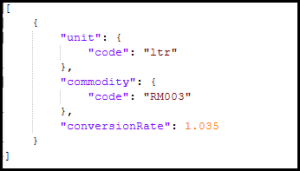
Таким образом, мы сообщаем системе, что при использовании молока будет использоваться коэффициент преобразования 1.035, переопределяющий коэффициент преобразования по умолчанию для единицы измерения «литр».
Этот пример JSON-файла можно скачать здесь.
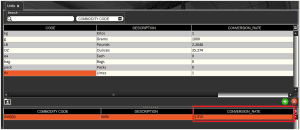
Используя приведенный выше файл, мы видим, что наш конкретный коэффициент пересчета для молока был добавлен в нижнюю панель «литр».
7.2. JSON — Экспорт
Для класса «UnitCommodity» экспорт JSON недоступен.
7.3. CSV – Импорт
Имя файла с определением заголовка/столбцов: “unitCommodity.csvh”
Завершенные заголовочные файлы следует разместить в папке: “<installdir>\SG Control Center\gateway\import\column_defs”
Имя импортируемого CSV-файла: “unitCommodity-datetime.csv”
CSV-файлы для импорта следует разместить в папке: "<каталог установки>\SG Control Center\gateway\import"
Образцы:
Заголовочный файл:
Заголовочные файлы, как правило, компилируются компанией SG Systems до интеграции CSV, но ниже мы приводим пример файла, который можно использовать для преобразования единиц измерения конкретных товаров:
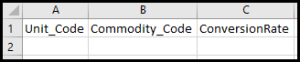
Для получения более подробной информации о структуре этих файлов, пожалуйста, посетите главную страницу интеграции.
Этот пример заголовочного файла можно скачать здесь.
Файл импорта CSV:
Затем мы можем использовать определенный порядок точек данных в заголовке, чтобы структурировать наш файл импорта. SG Systems может предоставить для этого файл шаблона, в котором перечислены точки данных для каждого столбца, чтобы было понятнее при заполнении списка. Обратите внимание, что эта первая строка может быть проигнорирована Центром управления и поэтому может быть сохранена в файле при отправке на импорт.
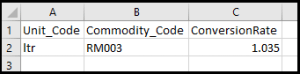
Здесь мы видим, что мы создаем то же самое преобразование единиц товара, что и в примере JSON выше.
Этот пример файла импорта можно скачать здесь.
После завершения импорта мы видим, что снова было создано новое преобразование единиц измерения для конкретного товара.
7.4. CSV — Экспорт
Как и в случае с экспортом в формате JSON, экспорт в формате CSV для класса «UnitCommodity» недоступен.


